5G end-to-end Build and Deployment with UERANSIM & Open5GS
1. Requirements
| Requirements | Version |
|---|---|
Operating System |
Ubuntu (Recommended: 20.04 or 22.04 LTS) Alternatively, other Linux distributions with package management support (e.g., Debian) may work but require adjustments. |
2. Build 5G Core
Follow the steps in the page below; stop when you see the configuration steps.
3. 5G Core Configuration
Now that you’ve installed Open5GS, you need to modify the configuration and set up your network for proper functionality.
You will need to modify the PLMN in your NRF and AMF config, and in case of AMF, further modify the TAC information.
If you are aiming to connect an external gNB to your core, you will also need to change the NGAP bind address of the AMF and the GTPU bind address of the UPF. If you are running an gNB stack locally, you will not need to make these changes.
amf.yaml
The AMF (Access and Mobility Function) communicates with the gNB over the N2 interface. It manages 5G NAS (Non-Access Stratum) messaging, which is used by UEs to request data services, handle handovers between gNB during movement, and authenticate to the network.
By default, the AMF binds to a loopback IP address. You won’t have to modify it if everything runs on the same machine, but modifications should be made for real gNBs or running UERANSIM on a different device.
Modify /etc/open5gs/amf.yaml to set the NGAP IP address, PLMN ID, TAC and NSSAI.
ngap:
    server:
      - address: 127.0.0.5
  metrics:
    server:
      - address: 127.0.0.5
        port: 9090
  guami:
    - plmn_id:
        mcc: 001
        mnc: 01
      amf_id:
        region: 2
        set: 1
  tai:
    - plmn_id:
        mcc: 001
        mnc: 01
      tac: 1
  plmn_support:
    - plmn_id:
        mcc: 001
        mnc: 01
      s_nssai:
        - sst: 1
amf.yaml
logger:
  file:
    path: /var/log/open5gs/amf.log
#  level: info   # fatal|error|warn|info(default)|debug|trace

global:
  max:
    ue: 1024  # The number of UE can be increased depending on memory size.
#    peer: 64

amf:
  sbi:
    server:
      - address: 127.0.0.5
        port: 7777
    client:
#      nrf:
#        - uri: http://127.0.0.10:7777
      scp:
        - uri: http://127.0.0.200:7777
  ngap:
    server:
      - address: 127.0.0.5
  metrics:
    server:
      - address: 127.0.0.5
        port: 9090
  guami:
    - plmn_id:
        mcc: 001
        mnc: 01
      amf_id:
        region: 2
        set: 1
  tai:
    - plmn_id:
        mcc: 001
        mnc: 01
      tac: 1
  plmn_support:
    - plmn_id:
        mcc: 001
        mnc: 01
      s_nssai:
        - sst: 1
  security:
    integrity_order : [ NIA2, NIA1, NIA0 ]
    ciphering_order : [ NEA0, NEA1, NEA2 ]
  network_name:
    full: Open5GS
    short: Next
  amf_name: open5gs-amf0
  time:
#    t3502:
#      value: 720   # 12 minutes * 60 = 720 seconds
    t3512:
      value: 540    # 9 minutes * 60 = 540 seconds

################################################################################
# SBI Server
################################################################################
#  o Override SBI address to be advertised to NRF
#  sbi:
#    server:
#      - dev:eth0
#        advertise: open5gs-amf.svc.local
#
#  sbi:
#    server:
#      - address: localhost
#        advertise:
#          - 127.0.0.99
#          - ::1
#
################################################################################
# SBI Client
################################################################################
#  o Direct communication with NRF interaction
#  sbi:
#    client:
#      nrf:
#        - uri: http://127.0.0.10:7777
#
#  o Indirect communication with delegated discovery
#  sbi:
#    client:
#      scp:
#        - uri: http://127.0.0.200:7777
#
#  o Indirect communication without delegated discovery
#  sbi:
#    client:
#      nrf:
#        - uri: http://127.0.0.10:7777
#      scp:
#        - uri: http://127.0.0.200:7777
#  discovery:
#    delegated: no
#
################################################################################
# HTTPS scheme with TLS
################################################################################
#  o Set as default if not individually set
#  default:
#    tls:
#      server:
#        scheme: https
#        private_key: /etc/open5gs/tls/amf.key
#        cert: /etc/open5gs/tls/amf.crt
#      client:
#        scheme: https
#        cacert: /etc/open5gs/tls/ca.crt
#  sbi:
#    server:
#      - address: amf.localdomain
#    client:
#      nrf:
#        - uri: https://nrf.localdomain
#
#  o Add client TLS verification
#  default:
#    tls:
#      server:
#        scheme: https
#        private_key: /etc/open5gs/tls/amf.key
#        cert: /etc/open5gs/tls/amf.crt
#        verify_client: true
#        verify_client_cacert: /etc/open5gs/tls/ca.crt
#      client:
#        scheme: https
#        cacert: /etc/open5gs/tls/ca.crt
#        client_private_key: /etc/open5gs/tls/amf.key
#        client_cert: /etc/open5gs/tls/amf.crt
#  sbi:
#    server:
#      - address: amf.localdomain
#    client:
#      nrf:
#        - uri: https://nrf.localdomain
#
################################################################################
# NGAP Server
################################################################################
#  o Listen on address available in `eth0` interface
#  ngap:
#    server:
#      - dev: eth0
#
################################################################################
# 3GPP Specification
################################################################################
#  o GUAMI
#  guami:
#    - plmn_id:
#        mcc: 999
#        mnc: 70
#      amf_id:
#        region: 2
#        set: 1
#        pointer: 4
#    - plmn_id:
#        mcc: 001
#        mnc: 01
#      amf_id:
#        region: 5
#        set: 2
#
#  o TAI
#  tai:
#    - plmn_id:
#        mcc: 001
#        mnc: 01
#      tac: [1, 3, 5]
#  tai:
#    - plmn_id:
#        mcc: 002
#        mnc: 02
#      tac: [6-10, 15-18]
#  tai:
#    - plmn_id:
#        mcc: 003
#        mnc: 03
#      tac: 20
#    - plmn_id:
#        mcc: 004
#        mnc: 04
#      tac: 21
#  tai:
#    - plmn_id:
#        mcc: 005
#        mnc: 05
#      tac: [22, 28]
#    - plmn_id:
#        mcc: 006
#        mnc: 06
#      tac: [30-32, 34, 36-38, 40-42, 44, 46, 48]
#    - plmn_id:
#        mcc: 007
#        mnc: 07
#      tac: 50
#    - plmn_id:
#        mcc: 008
#        mnc: 08
#      tac: 60
#    - plmn_id:
#        mcc: 009
#        mnc: 09
#      tac: [70, 80]
#
#  o PLMN Support
#  plmn_support:
#    - plmn_id:
#        mcc: 999
#        mnc: 70
#      s_nssai:
#        - sst: 1
#          sd: 010000
#    - plmn_id:
#        mcc: 999
#        mnc: 70
#      s_nssai:
#        - sst: 1
#
#  o Access Control
#  access_control:
#    - default_reject_cause: 13
#    - plmn_id:
#        reject_cause: 15
#        mcc: 001
#        mnc: 01
#    - plmn_id:
#        mcc: 002
#        mnc: 02
#    - plmn_id:
#        mcc: 999
#        mnc: 70
#
#  o Relative Capacity
#  relative_capacity: 100
nrf.yaml
Modify /etc/open5gs/nrf.yaml to set the PLMN ID if you modified it.
nrf.yaml
logger:
file:
path: /var/log/open5gs/nrf.log
# level: info # fatal|error|warn|info(default)|debug|trace
global:
max:
ue: 1024 # The number of UE can be increased depending on memory size.
# peer: 64
nrf:
  serving:  # 5G roaming requires PLMN in NRF
    - plmn_id:
        mcc: 001
        mnc: 01
sbi:
server:
- address: 127.0.0.10
port: 7777
################################################################################
# SBI Server
################################################################################
# o Override SBI address to be advertised to NRF
# sbi:
# server:
# - dev: eth0
# advertise: open5gs-nrf.svc.local
#
# sbi:
# server:
# - address: localhost
# advertise:
# - 127.0.0.99
# - ::1
#
################################################################################
# HTTPS scheme with TLS
################################################################################
# o Set as default if not individually set
# default:
# tls:
# server:
# scheme: https
# private_key: /etc/open5gs/tls/nrf.key
# cert: /etc/open5gs/tls/nrf.crt
# client:
# scheme: https
# cacert: /etc/open5gs/tls/ca.crt
# sbi:
# server:
# - address: nrf.localdomain
#
# o Add client TLS verification
# default:
# tls:
# server:
# scheme: https
# private_key: /etc/open5gs/tls/nrf.key
# cert: /etc/open5gs/tls/nrf.crt
# verify_client: true
# verify_client_cacert: /etc/open5gs/tls/ca.crt
# client:
# scheme: https
# cacert: /etc/open5gs/tls/ca.crt
# client_private_key: /etc/open5gs/tls/nrf.key
# client_cert: /etc/open5gs/tls/nrf.crt
# sbi:
# server:
# - address: nrf.localdomain
upf.yaml
Modify /etc/open5gs/upf.yaml to set the GTP-U address if you need to.
upf.yaml
logger:
  file:
    path: /var/log/open5gs/upf.log
#  level: info   # fatal|error|warn|info(default)|debug|trace

global:
  max:
    ue: 1024  # The number of UE can be increased depending on memory size.
#    peer: 64

upf:
  pfcp:
    server:
      - address: 127.0.0.7
    client:
#      smf:     #  UPF PFCP Client try to associate SMF PFCP Server
#        - address: 127.0.0.4
  gtpu:
    server:
      - address: 127.0.0.7
  session:
    - subnet: 10.45.0.0/16
      gateway: 10.45.0.1
    - subnet: 2001:db8:cafe::/48
      gateway: 2001:db8:cafe::1
  metrics:
    server:
      - address: 127.0.0.7
        port: 9090

################################################################################
# PFCP Server
################################################################################
# o Override PFCP address to be advertised to SMF in PFCP association
#  pfcp:
#    server:
#      - dev: eth0
#        advertise: open5gs-upf.svc.local
#
################################################################################
# GTP-U Server
################################################################################
#  o Override SGW-U GTP-U address to be advertised inside S1AP messages
#  gtpu:
#    server:
#      - dev: ens3
#        advertise: upf1.5gc.mnc001.mcc001.3gppnetwork.org
#
#  o User Plane IP Resource information
#  gtpu:
#    server:
#      - address:
#        - 127.0.0.7
#        - ::1
#        teid_range_indication: 4
#        teid_range: 10
#        network_instance: internet
#        source_interface: 0
#      - address: 127.0.10.4
#        teid_range_indication: 4
#        teid_range: 5
#        network_instance: ims
#        source_interface: 1
#
################################################################################
# 3GPP Specification
################################################################################
#
#  o Specific DNN/APN(e.g 'ims') uses 10.46.0.1/16, 2001:db8:babe::1/48
#  $ sudo ip addr add 10.45.0.1/16 dev ogstun
#  $ sudo ip addr add 2001:db8:cafe::1/48 dev ogstun2
#  $ sudo ip addr add 10.46.0.1/16 dev ogstun3
#  $ sudo ip addr add 2001:db8:babe::1/48 dev ogstun3
#
#  session:
#    - subnet: 10.45.0.0/16
#      gateway: 10.45.0.1
#      dnn: internet
#    - subnet: 2001:db8:cafe::/48
#      dnn: internet
#      dev: ogstun2
#    - subnet: 10.46.0.0/16
#      gateway: 10.46.0.1
#      dnn: ims
#      dev: ogstun3
#    - subnet: 2001:db8:babe::/48
#      dnn: ims
#      dev: ogstun3
After configuring, restart the daemons.
sudo systemctl restart open5gs-nrfd
sudo systemctl restart open5gs-amfd
sudo systemctl restart open5gs-upfd
5. Build / Configure gNB & UE
Follow the steps in the page below; follow all the configuration steps.
open5gs-ue.yaml
# IMSI number of the UE. IMSI = [MCC|MNC|MSISDN] (In total 15 digits)
supi: 'imsi-001010000000001'
# Mobile Country Code value of HPLMN
mcc: '001'
# Mobile Network Code value of HPLMN (2 or 3 digits)
mnc: '01'
# SUCI Protection Scheme : 0 for Null-scheme, 1 for Profile A and 2 for Profile B
protectionScheme: 0
# Home Network Public Key for protecting with SUCI Profile A
homeNetworkPublicKey: '5a8d38864820197c3394b92613b20b91633cbd897119273bf8e4a6f4eec0a650'
# Home Network Public Key ID for protecting with SUCI Profile A
homeNetworkPublicKeyId: 1
# Routing Indicator
routingIndicator: '0000'

# Permanent subscription key
key: '465B5CE8B199B49FAA5F0A2EE238A6BC'
# Operator code (OP or OPC) of the UE
op: 'E8ED289DEBA952E4283B54E88E6183CA'
# This value specifies the OP type and it can be either 'OP' or 'OPC'
opType: 'OPC'
# Authentication Management Field (AMF) value
amf: '8000'
# IMEI number of the device. It is used if no SUPI is provided
imei: '356938035643803'
# IMEISV number of the device. It is used if no SUPI and IMEI is provided
imeiSv: '4370816125816151'

# List of gNB IP addresses for Radio Link Simulation
gnbSearchList:
  - 127.0.0.1

# UAC Access Identities Configuration
uacAic:
  mps: false
  mcs: false

# UAC Access Control Class
uacAcc:
  normalClass: 0
  class11: false
  class12: false
  class13: false
  class14: false
  class15: false

# Initial PDU sessions to be established
sessions:
  - type: 'IPv4'
    apn: 'internet'
    slice:
      sst: 1

# Configured NSSAI for this UE by HPLMN
configured-nssai:
  - sst: 1

# Default Configured NSSAI for this UE
default-nssai:
  - sst: 1
    sd: 1

# Supported integrity algorithms by this UE
integrity:
  IA1: true
  IA2: true
  IA3: true

# Supported encryption algorithms by this UE
ciphering:
  EA1: true
  EA2: true
  EA3: true

# Integrity protection maximum data rate for user plane
integrityMaxRate:
  uplink: 'full'
  downlink: 'full'
open5gs-gnb.yaml
mcc: '001'          # Mobile Country Code value
mnc: '01'           # Mobile Network Code value (2 or 3 digits)

nci: '0x000000010'  # NR Cell Identity (36-bit)
idLength: 32        # NR gNB ID length in bits [22...32]
tac: 1              # Tracking Area Code

linkIp: 127.0.0.1   # gNB's local IP address for Radio Link Simulation (Usually same with local IP)
ngapIp: 127.0.0.1   # gNB's local IP address for N2 Interface (Usually same with local IP)
gtpIp: 127.0.0.1    # gNB's local IP address for N3 Interface (Usually same with local IP)

# List of AMF address information
amfConfigs:
  - address: 127.0.0.5
    port: 38412

# List of supported S-NSSAIs by this gNB
slices:
  - sst: 1

# Indicates whether or not SCTP stream number errors should be ignored.
ignoreStreamIds: true
6. Register Subscriber Information
Open up Open5gs WebUI.
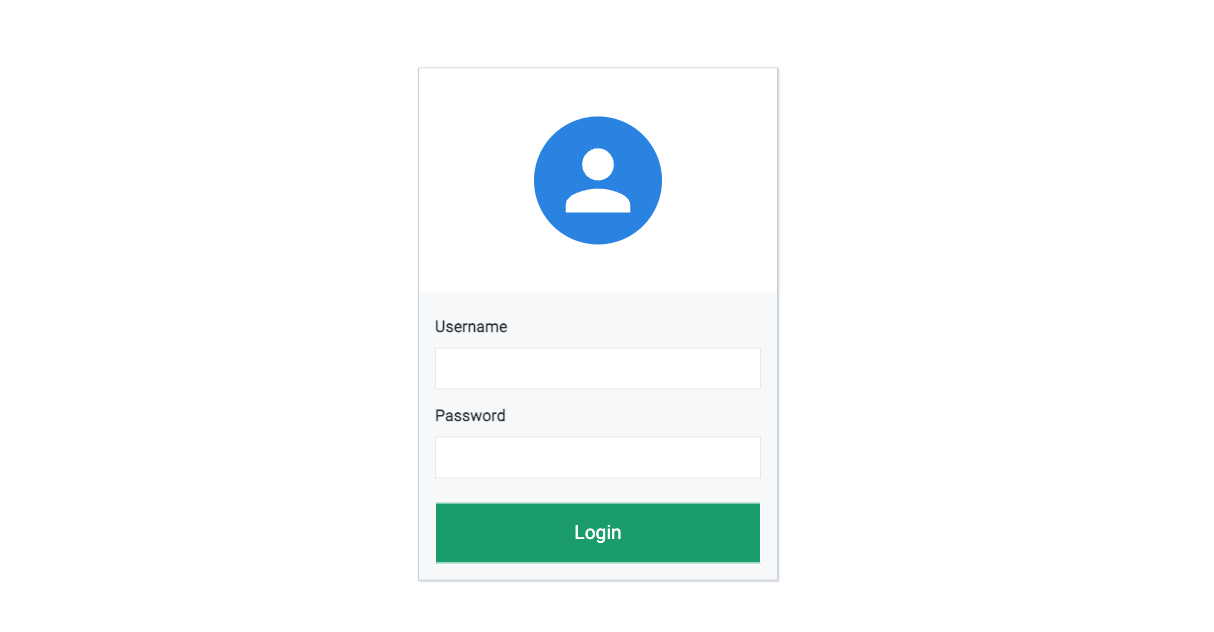
Connect and login with admin account
Add subscriber information
-
Go to
subscriberMenu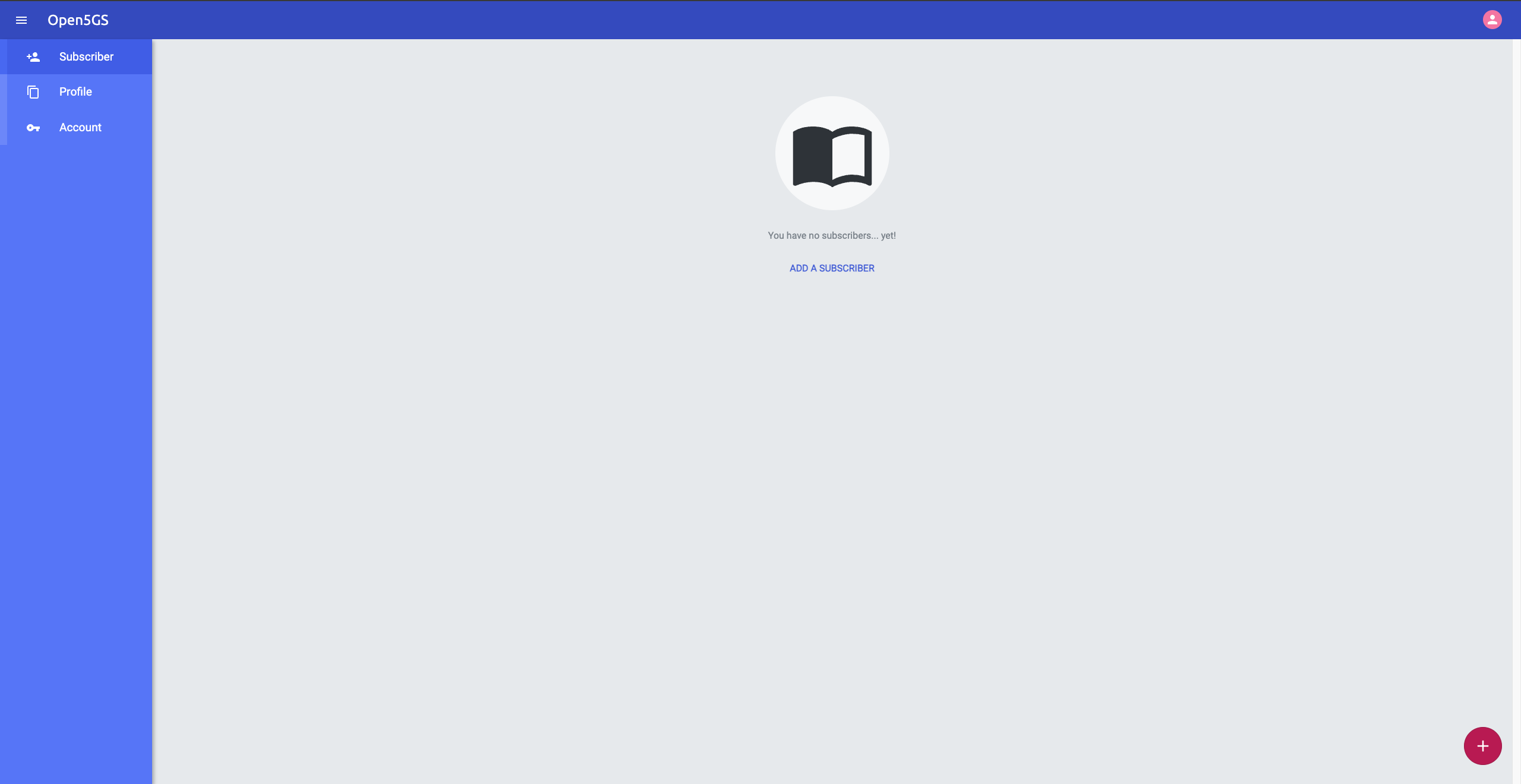
-
Click
+button to add a new subscriber -
Fill the IMSI, security context(K, OPc, AMF), and APN of the subscriber
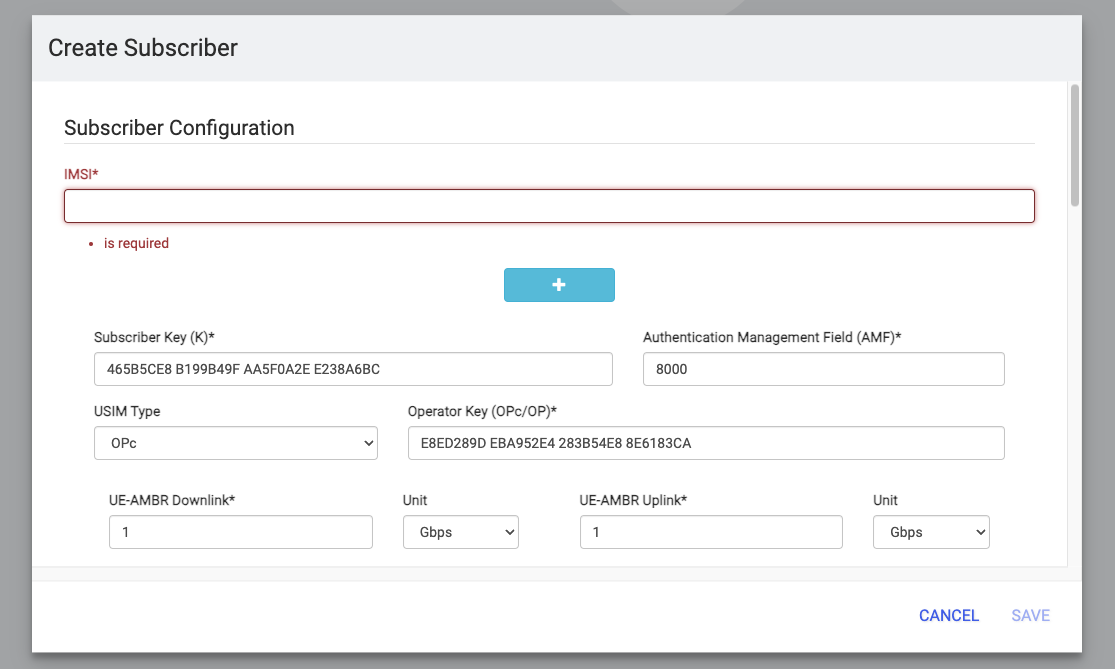
Make sure the information being inputed here matches with the information on the ue config file.
IMSI number of the UE. IMSI = [MCC|MNC|MSISDN] (In total 15 digits)
supi: 'imsi-001010000000001'
# Mobile Country Code value of HPLMN
mcc: '001'
# Mobile Network Code value of HPLMN (2 or 3 digits)
mnc: '01'

...

# Permanent subscription key
key: '465B5CE8B199B49FAA5F0A2EE238A6BC'
# Operator code (OP or OPC) of the UE
op: 'E8ED289DEBA952E4283B54E88E6183CA'
# This value specifies the OP type and it can be either 'OP' or 'OPC'
opType: 'OPC'
# Authentication Management Field (AMF) value
amf: '8000'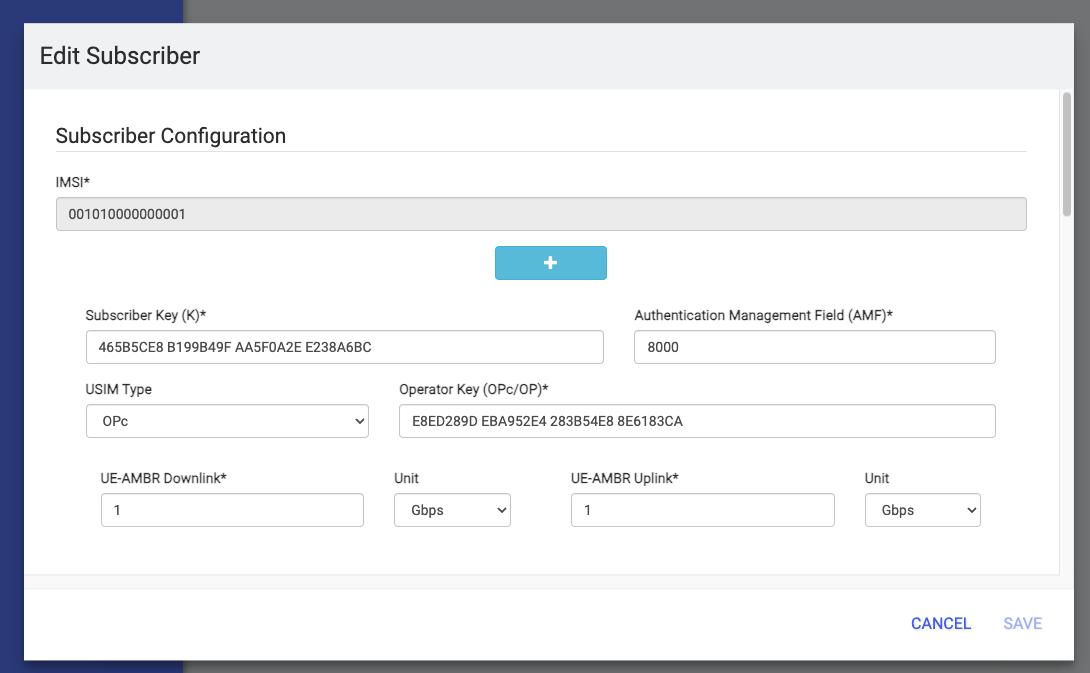
-
Click
SAVE
7. Run gNB and UE
After finishing all the configurations, start gNB and UE

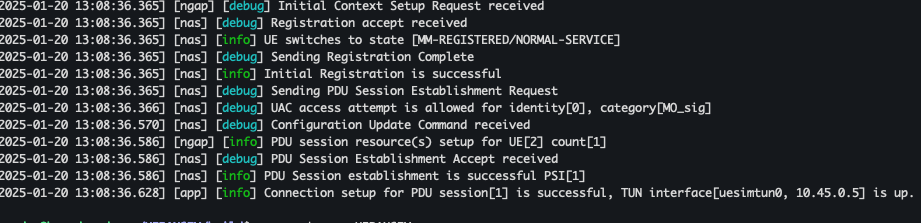
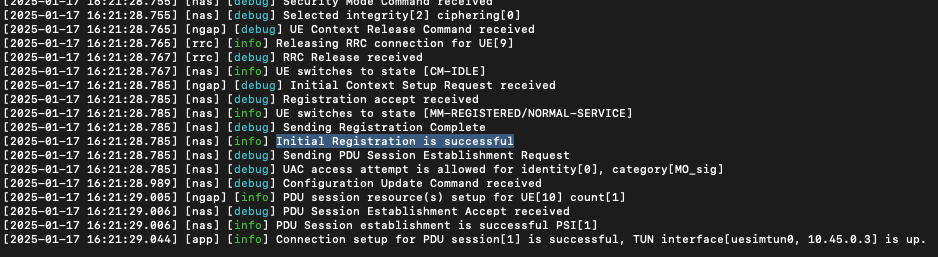
Now everything should work, and you should see that the Initial Registration is successful.
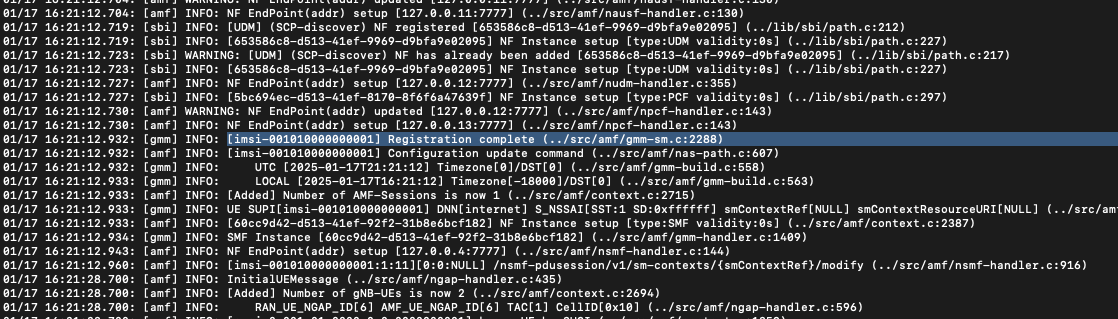
You can look at the amf log to see the communications.
You should be able to see that the UE Registration is complete here as well.
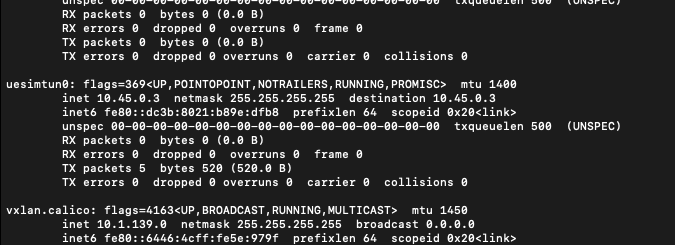
With ifconfig, you should see the session come up, and a new NIC, uesimtun0, on the machine.
RESOURCES: My first 5G Core: Open5Gs and UERANSIM